
Gusta 3D
Parametric CAD in the browser: a free STL editor for 3D printing
Gusta 3D is a parametric 3D editor that runs in a browser tab. Sketch a profile, constrain it, extrude it into a solid, cut holes and threads through it, check it against your printer, and export an STL or STEP file. No install, and an AI copilot that models with you rather than at you.
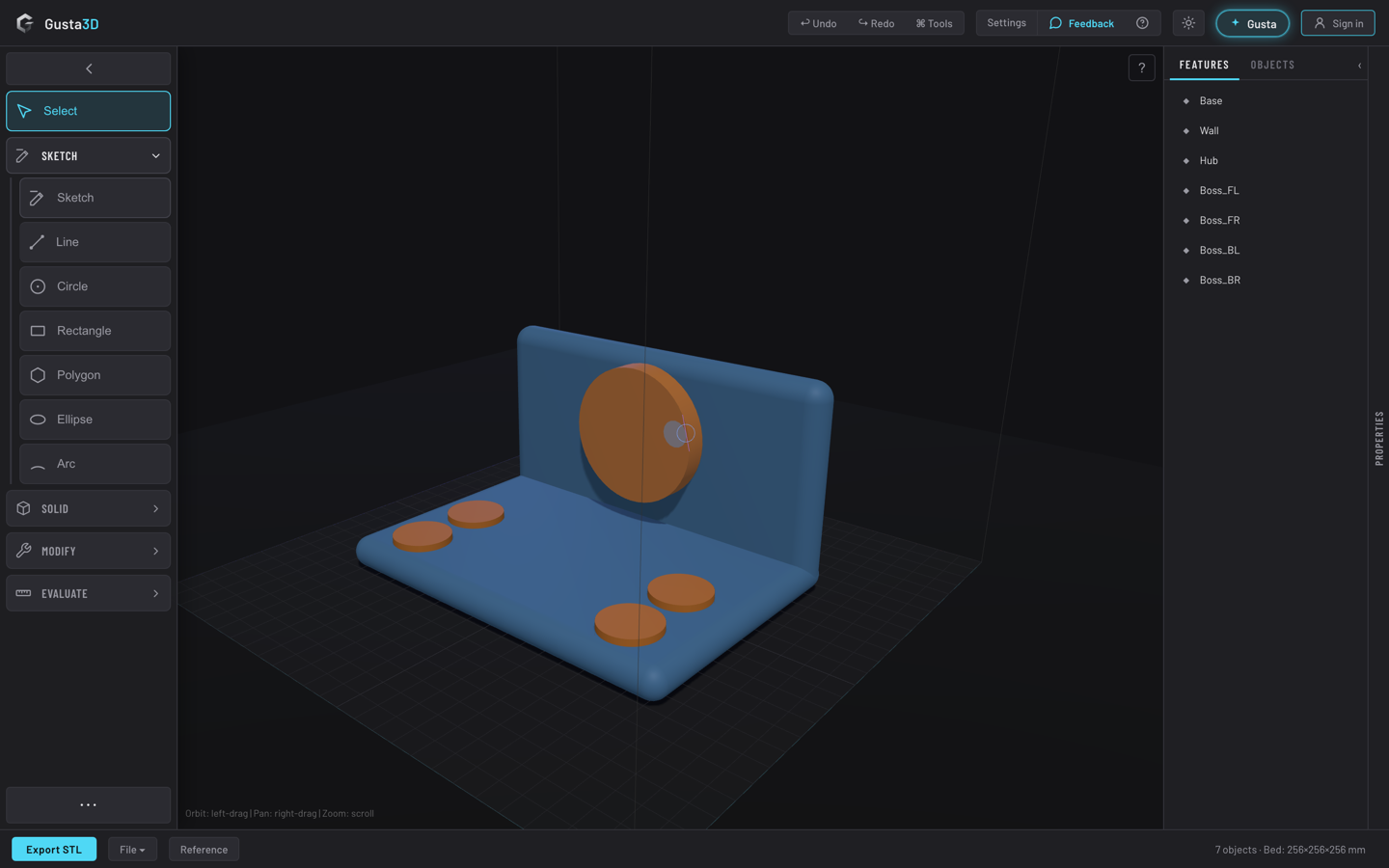
What Gusta 3D is
Designing a part for 3D printing usually means one of two bad options: a mesh sculpting tool that cannot hold a dimension, or a desktop CAD package that wants an installer, a licence and a tutorial series first. Gusta 3D is the middle path: browser CAD with a real parametric spine, aimed at the person who wants a printable object by the end of the evening.
The scene is not a bag of triangles. It is an ordered graph of parametric features: a solid, a cut, a drilled hole, a fillet. The mesh you see is the output of evaluating that recipe, never the source of truth, so changing the height of the base rebuilds everything downstream of it.
Who it is for
People with a printer and a problem: a bracket, a mount, an adapter, an enclosure, a jig. Makers who know their way around a slicer but bounce off desktop CAD. Anyone who wants a free online STL editor that produces parts with correct dimensions rather than approximately correct blobs.
What is inside
Sketching with constraints
Open a sketch on a face or a plane, draw polylines and circles, then constrain them: coincident, parallel, dimensional. A solver resolves the sketch and reports its remaining degrees of freedom, so you can tell a shape that is pinned down from one that will drift. Then extrude it into a solid.
Variables and equations
Dimensions do not have to be typed numbers. Define named variables and bind geometry to expressions, so a wall thickness or bolt spacing is set once and every feature depending on it follows. Changing the design becomes editing a value.
Solids and the operations you expect
Primitives cover boxes, cylinders, spheres, cones and wedges, plus revolve, loft and sweep. On top of those: union and subtract, pockets, shells, ribs, drafts, thicken and split, drilling and patterned drilling, linear, radial and grid arrays, and true edge fillets and chamfers computed by an OpenCascade B-rep kernel rather than faked on the mesh.
Parts that have to fit real hardware
ISO metric threads from M2 to M12 are generated with a fit clearance, so a printed screw still turns into a printed hole. There are bolt threads and threaded holes, helices and coils, and a gear family covering spur, helical, bevel, ring and planetary gears. Joints can be defined and actuated, with a motion clearance check that catches a mechanism colliding with itself before you spend the filament finding out.
A printability report before you slice
One call runs the checks that normally bite at the printer: overhang angle, wall thickness, stability, minimum feature size, bed fit, and whether the geometry is manifold, the failure that makes exports silently drop parts. Printer presets cover Bambu P1S, X1C, A1 and A1 mini, Prusa MK4 and Ender 3. There is also auto-orientation and snap to bed.
Working against geometry you already have
Import existing CAD or mesh files and design against them. Parts can be marked reference only, which ghosts them and excludes them from export, or marked as keep-out zones your design may not intersect. The assembly check enforces that, so a mount fouling a connector fails before it prints.
Getting the model out
STL for slicers. 3MF, which most slicers now prefer. OBJ for mesh interchange. glTF as a .glb scene with colours intact. And, for CAD interchange, STEP in AP214 and IGES, written from the exact B-rep, so the file opens in another CAD tool as editable solids.
What makes it different
The AI uses the tools instead of talking about them. Ask for a 40 millimetre bracket with two M4 holes and Gusta drives the same command surface your clicks drive. Everything it creates is an ordinary feature in the tree you can select, edit or delete. It is also gated: before it may say it is done, the code runs the design specification and printability checks against what it built. An assistant that cannot declare victory over a model that will not print is a more useful one.
Your work stays yours. Models, exports and project files belong to you. Sell the print, publish the STL, use it commercially: none of that requires our permission.
Local first, and dependency honest. Autosave keeps your work in the browser and geometry is computed on your machine. Every third-party library is a pinned, committed file rather than a load-time fetch from a CDN, so a package hijack cannot reach your account and a CDN outage cannot brick the editor.
Free to start. The editor is free. Only AI work spends tokens, and during the open beta those tokens are granted rather than sold.
Questions people ask
Is Gusta 3D free?
Modeling is free. Sketching, constraints, booleans, fillets, threads, gears, the printability checks and every export cost nothing. Only the AI copilot is metered, and it runs on Gusta tokens. Gustalabs is in open beta, so nothing is for sale yet and those tokens are granted free while we test.
Do I need to install anything, or a powerful computer?
No install of any kind: Gusta 3D is a web page at 3d.gustalabs.com. It needs a current browser with WebGL, which any machine from the last several years has. Heavy geometry runs in a worker, so the viewport keeps moving while a boolean bakes.
What file formats can I export, and can I import an STL?
Export gives you STL for slicers, 3MF as the slicer-native alternative, OBJ for mesh interchange, and glTF as a .glb scene with colours preserved. For CAD interchange there is STEP (AP214) and IGES, written from an exact B-rep rather than a triangulated approximation. You can also import existing CAD and mesh files and design against them.
Is this real parametric CAD, or a mesh toy?
It is parametric. The scene is an ordered graph of features, so a model is the recipe rather than the mesh, and editing an early dimension rebuilds everything downstream. Sketches are solved by a constraint solver with a degrees-of-freedom readout, dimensions can be driven by variables and equations, and true fillets and STEP output come from an OpenCascade B-rep kernel.
Will the model actually print?
One call runs the checks people usually discover in the slicer or on the bed: overhang angle, wall thickness, stability, minimum feature size, bed fit, and whether the geometry is manifold. Printer presets cover Bambu P1S, X1C, A1 and A1 mini, Prusa MK4 and Ender 3, plus a custom size.
Do I own the models I make?
Yes. Your models, exports and project files are yours, and our terms assign you any rights we might otherwise hold in AI-assisted output. Sell the print, publish the STL, list it commercially: none of that needs our permission.
Does it work on an iPad, and does it work offline?
On a tablet or phone the interface becomes a sheet shell: a bottom navigation bar and slide-up panels driving the same controls as the desktop layout. Offline, we would rather be precise: there is no offline installer and no service worker, so the page has to load over the internet. After that, modeling and export run in your browser and autosave locally.
Do I need an account?
Not to model or to export. The editor opens and works signed out, and autosave keeps your work in the browser. An account only unlocks the AI copilot and cloud saves, and the same account signs you in to Gusta Music, Draw, Photo, Video, GIF and Home.
Open it and model something
Start from a primitive, a sketch, or a sentence describing the part you need. Everything it builds is a feature you can change.
Open Gusta 3DAlso from Gustalabs: Gusta Music, a browser music studio, Gusta Draw, an online vector and SVG editor, Gusta Photo, a photo editor that never invents a pixel, Gusta Video, a video editor where your footage never leaves your device, Gusta GIF, screenshot to animated GIF, and Gusta Home, for planning the house you already have.