
Gusta Draw
An online vector editor: design in real SVG, export SVG, PNG and PDF
Gusta Draw is a vector design studio that runs in a browser tab: pen and pencil tools over genuine SVG path data, a node editor with bezier handles, boolean path operations, gradients, text you can convert to outlines, and a layers panel with folders. Nothing to install, and an AI copilot that designs in editable shapes.
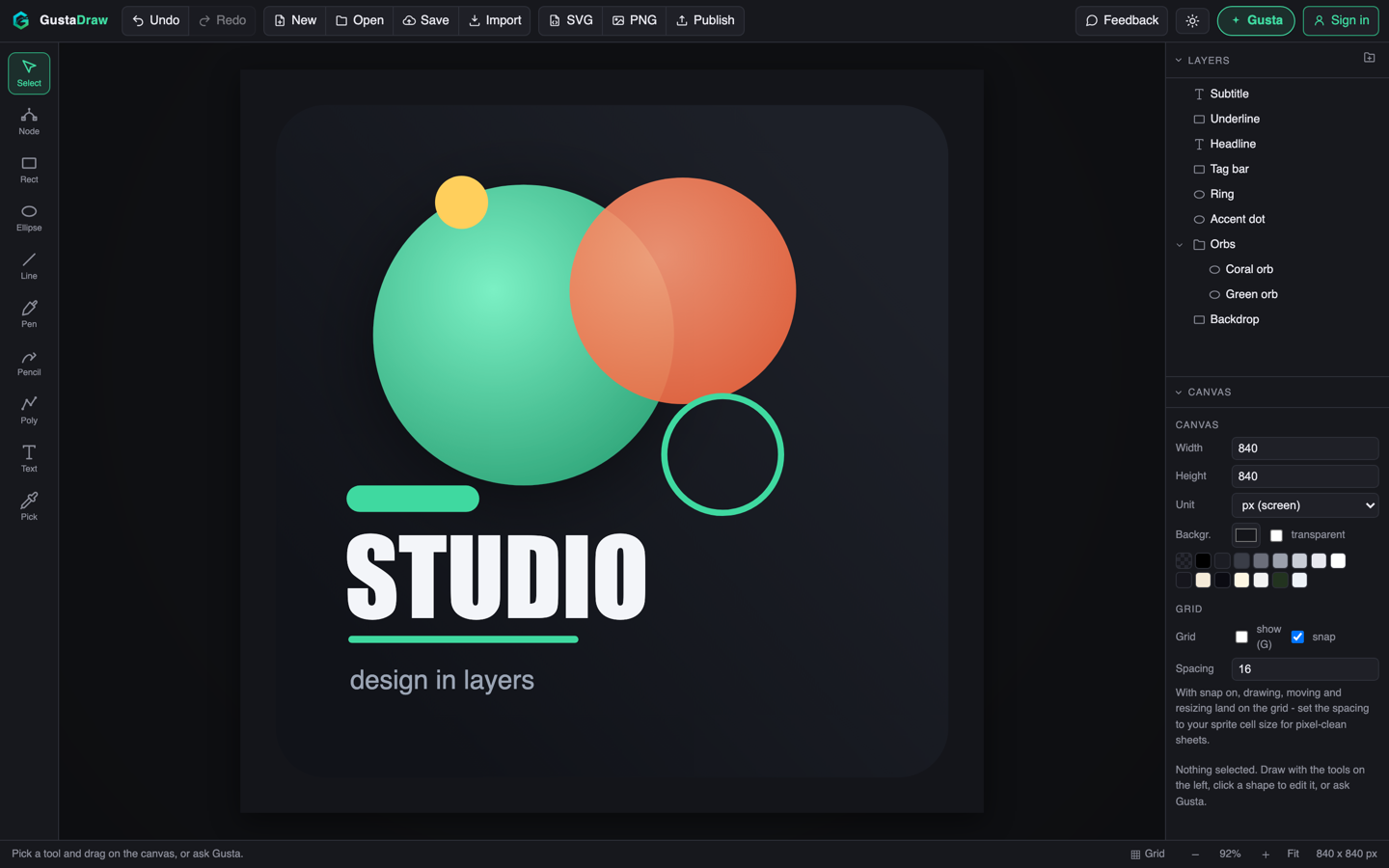
What Gusta Draw is
It is an SVG editor online, in the plain sense of that phrase: the thing you edit is a vector document, and the thing you export is the same vector document. Album covers, stickers, logos, posters, app icons, cut files for a laser or vinyl cutter. If the output must stay crisp when scaled, or be cut by a machine, this is the tool you want.
The design is a plain JSON document, and the order of its shape list is the stacking order in the layers panel. Every change, from a drag, a shortcut or the AI, goes through one editing layer, which makes undo universal and keeps the copilot from being a separate system bolted on the side.
Who it is for
People who need one good graphic and do not want to install a design suite for it. Musicians making cover art. Makers cutting stickers and signs. Small shops needing a logo in a format their printer will accept. Anyone who has searched for a free online vector editor and found either a paint program or a paywall.
What is inside
Tools that draw real paths
Select, node, rectangle, ellipse, line, pen, pencil, polyline, text and eyedropper. The pen places corners on a click and smooth handles on a drag. The pencil takes a freehand stroke, simplifies it, and fits smooth curves through what you meant rather than every tremor of the mouse. The node tool exposes anchors and bezier handles on any path.
Layers that behave like layers
A dock with the front-most shape on top, folders you can expand and collapse, an eye toggle and a padlock on every row, inline rename, and drag to reorder or move something into a folder. Hidden shapes render nowhere, including exports. Locked shapes ignore clicks until you unlock them.
Shaping geometry rather than nudging points
Four boolean operations, unite, subtract, intersect and exclude, on an integer-grid geometry engine that copes with self-intersections and holes. A sticker outline that offsets the union of your selection outward with round joins, landing behind the artwork as a cut line. A live simplify slider. And stroke-to-outline, turning a stroked shape into a filled band you can node-edit.
Type
Curated font stacks that are safe across systems, plus your own TTF or OTF upload when a brand face matters. Create Outlines converts text into path shapes using the real glyph curves for embedded faces, so a headline can be cut or boolean-ed like any other geometry. Embedded fonts travel inside the saved document.
Colour and finish
Linear and radial gradients with an on-canvas editor: drag the axis, drag each stop, add a stop by double-clicking the line. Blur and drop shadow as shape effects. Curated palettes and type pairings applied to a whole document in one step, remapping colours by brightness rank. And a seeded hand-drawn roughen effect, whose seed lives in the document, so the same file renders the same wobble forever.
Arrangement and precision
Align, distribute, arrange into a grid, attach one shape's anchor point to another's, and mirror a selection across a symmetry line. There is a snapping grid, zoom and pan, rotation with a fifteen-degree shift constraint, and arrow key nudging.
Getting the design out
SVG, byte-identical to the render on your screen because both come from the same code path. PNG at scale factors or explicit pixel widths, several sizes in one export, with a transparent background option. And PDF written as true vector paths, which is the answer to converting an SVG to a PDF a print shop will accept. You can also save the editable .gustadraw.json document, fonts and all, and drag it back onto the canvas later.
What makes it different
The AI uses the tools instead of talking about them. Ask Gusta for a sticker and it dispatches the same commands your clicks do: adding paths, naming them, grouping them into folders, applying a palette. What lands is a layered document you can take apart, not a picture of one. Before it may say it has finished, the code checks its work: filled paths closed, everything inside the canvas, adequate contrast, a minimum stroke width on millimetre documents, and semantic layer names.
Your work stays yours. Designs, exports and project files belong to you. No rights tiers, no attribution requirement, no separate commercial licence.
Local first. The working document autosaves in your browser, and you can keep an editable copy on your own disk without creating an account. Rendering, geometry and export happen on your machine.
Free to start. The editor is free. Only AI work spends tokens, and in the open beta those tokens are granted rather than sold.
Questions people ask
Is Gusta Draw free?
Drawing is free. Every tool, every effect, the starter designs and all three export formats cost nothing. Only the AI copilot is metered, and it runs on Gusta tokens. Gustalabs is in open beta, so nothing is for sale yet and those tokens are granted free while we test.
Do I need to download or install anything?
No. Gusta Draw is a web page at draw.gustalabs.com. There is no installer, no plugin and no font manager to set up: the curated typefaces are system-safe stacks or travel inside the app, and you can upload your own TTF or OTF file when you need a brand face.
Can I export SVG for a laser cutter, a vinyl cutter or a Cricut?
Yes, and the app is built with that job in mind. A canvas can be measured in millimetres rather than pixels, the sticker outline tool builds a cut line by offsetting the union of your selection outward with round joins, and a minimum stroke width check on millimetre documents stops a cut path being thinner than a machine can follow.
Can I convert my SVG to a PDF?
Yes. Import the SVG and export as PDF. The PDF is written as true vector paths rather than a rasterised image, so it stays sharp at any size. PNG export is there when you need pixels: at scale factors or explicit pixel widths, several sizes in one go, with a transparent background option.
Do I own what I design?
Yes. Your designs, exports and project files belong to you, and our terms assign you any rights we might otherwise hold in AI-assisted output. Sell the stickers, print the poster, use the logo commercially: no rights tiers and no attribution requirement.
Does it work on an iPad or a phone?
Yes. On a tablet or phone the layout becomes a sheet shell: the tool rail turns into a horizontal strip, the inspector becomes a bottom sheet, and a bottom navigation bar drives the same controls the desktop layout uses. Touch targets grow on coarse pointers.
Does Gusta Draw work offline?
The drawing tools work signed out and without a server, but there is no offline installer and no service worker, so the page has to load over the internet. After that, editing, rendering and export all run in your browser and your document autosaves locally. The copilot, cloud saves and publishing need a connection.
Do I need an account?
Not to draw or export. The editor opens and works signed out, and you can save an editable .gustadraw.json file to your own disk and open it later. An account only unlocks the AI copilot, cloud saves and publishing, and the same account signs you in to Gusta Music, 3D, Photo, Video, GIF and Home.
Open it and draw something
There are free starter designs for a sticker, a logo, a poster and an app icon, if you would rather not start from an empty canvas.
Open Gusta DrawAlso from Gustalabs: Gusta Music, a browser music studio, Gusta 3D, parametric CAD for 3D printing, Gusta Photo, a photo editor that never invents a pixel, Gusta Video, a video editor where your footage never leaves your device, Gusta GIF, screenshot to animated GIF, and Gusta Home, for planning the house you already have.