
Gusta GIF
Screenshot to animated GIF, in your browser, in under a minute
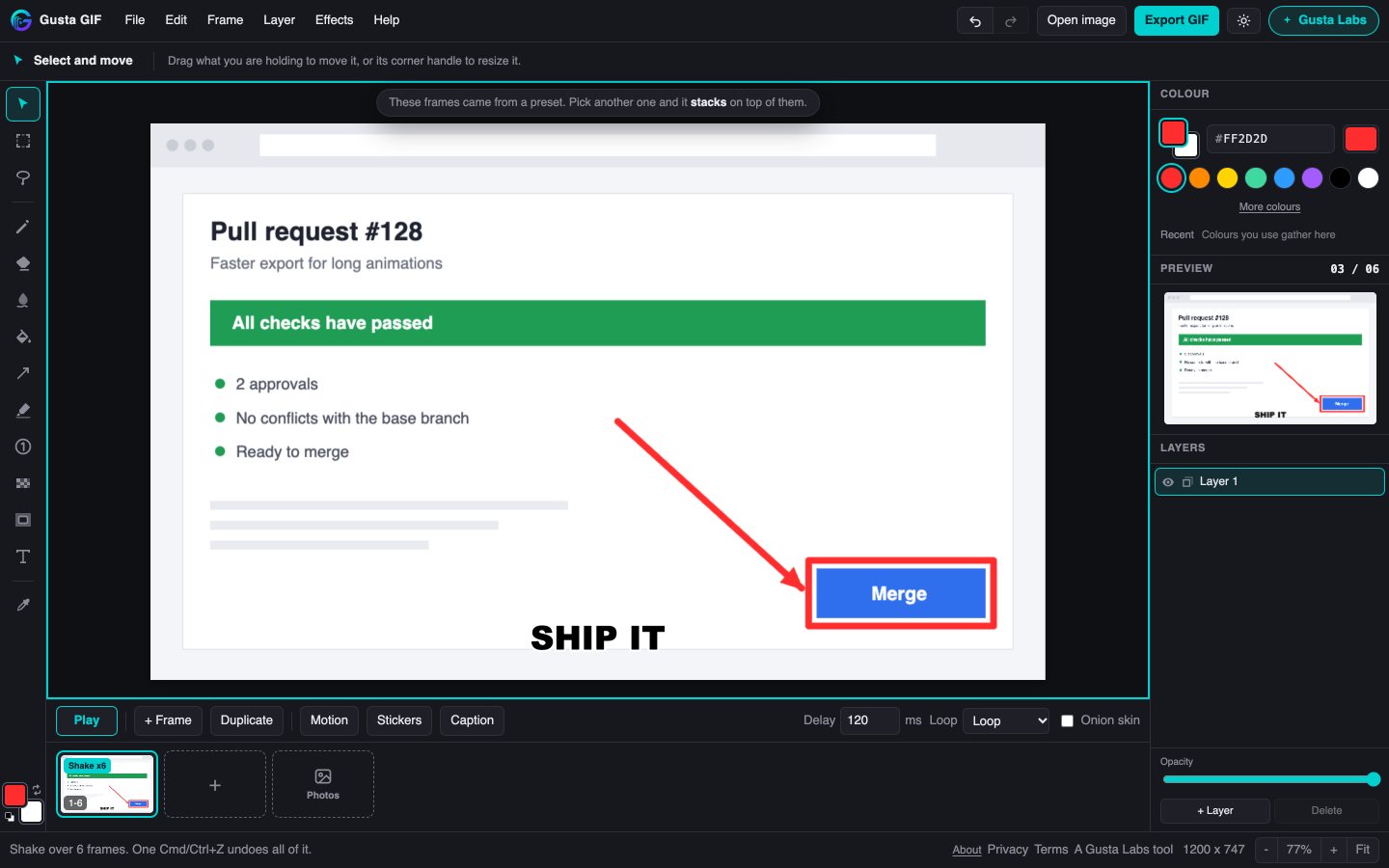
Gusta GIF makes the GIF you send a colleague: paste a screenshot, draw an arrow at what matters, make it move across a few frames, and send it to the chat. Free, no account, no watermark, and your images never leave your browser.
What Gusta GIF is
A paint program crossed with a flipbook, not an animation suite. You paste a picture, draw on it with tools anyone already knows, and the frames along the bottom become the GIF. Anything you draw stays movable until you stamp it down, and duplicating a frame carries it along. So drawing an arrow once, duplicating the frame twice and nudging the arrow on each copy is the whole animation workflow.
It also reads GIFs as well as writing them: drop one in and it comes apart into frames you can draw on, at its own size and speed. Everything happens in the browser tab. Nothing is uploaded to make, play or encode the GIF.
Who it is for
Anyone who needs to show rather than tell: where the button is, which setting to change, what broke and when. Support teams answering the same question twice, developers adding a GIF to a pull request, people writing a how-to for a colleague, and anyone who wants a reaction GIF with a caption on it. If you have searched for a free GIF maker with no watermark and no sign-up, this is that.
What is inside
Ways in
Paste with Cmd or Ctrl and V, drop an image on the page, or open a file. Drop in a GIF and it is split into editable frames in one undo step; a long one is thinned evenly across the loop rather than cut short. On a phone, Photos opens your library, and several photos picked at once become a slideshow, one frame each. Or start from a layout: Before and after, 3, 2, 1, Breaking news, or Approved, each built from ordinary frames you can change.
Tools for pointing at things
Arrows that come solid, open, curved or double-ended, with an optional white edge so red stays visible on a red interface. Lines, boxes and ellipses; a highlighter that keeps black text black; numbered step badges that count up as you click; a magnifier for small text; a spotlight that keeps one box lit and dims the rest; and redact, which pixelates or blocks out an area on every frame so it cannot be un-blurred. There is a pencil with Apple Pencil pressure, an eraser, smudge and fill, marquee and lasso selection to move or copy pixels, and up to eight layers, one of which can show on every frame for a logo or a background.
Words
Captions in heavy outlined meme type at the top or the bottom, or above the picture in a white band, the classic reaction layout. Four typefaces at any size. Words can type themselves out, wobble, cycle colour, arrive word by word or bounce in, and a caption can start on a later frame so the punchline lands after its setup. Word stickers such as LGTM, SHIPPED, NOPE and +1 sit on coloured pills, next to drawn stickers like speech bubbles, speed lines and sparkles. Text stays editable, and can move across frames.
Making it move
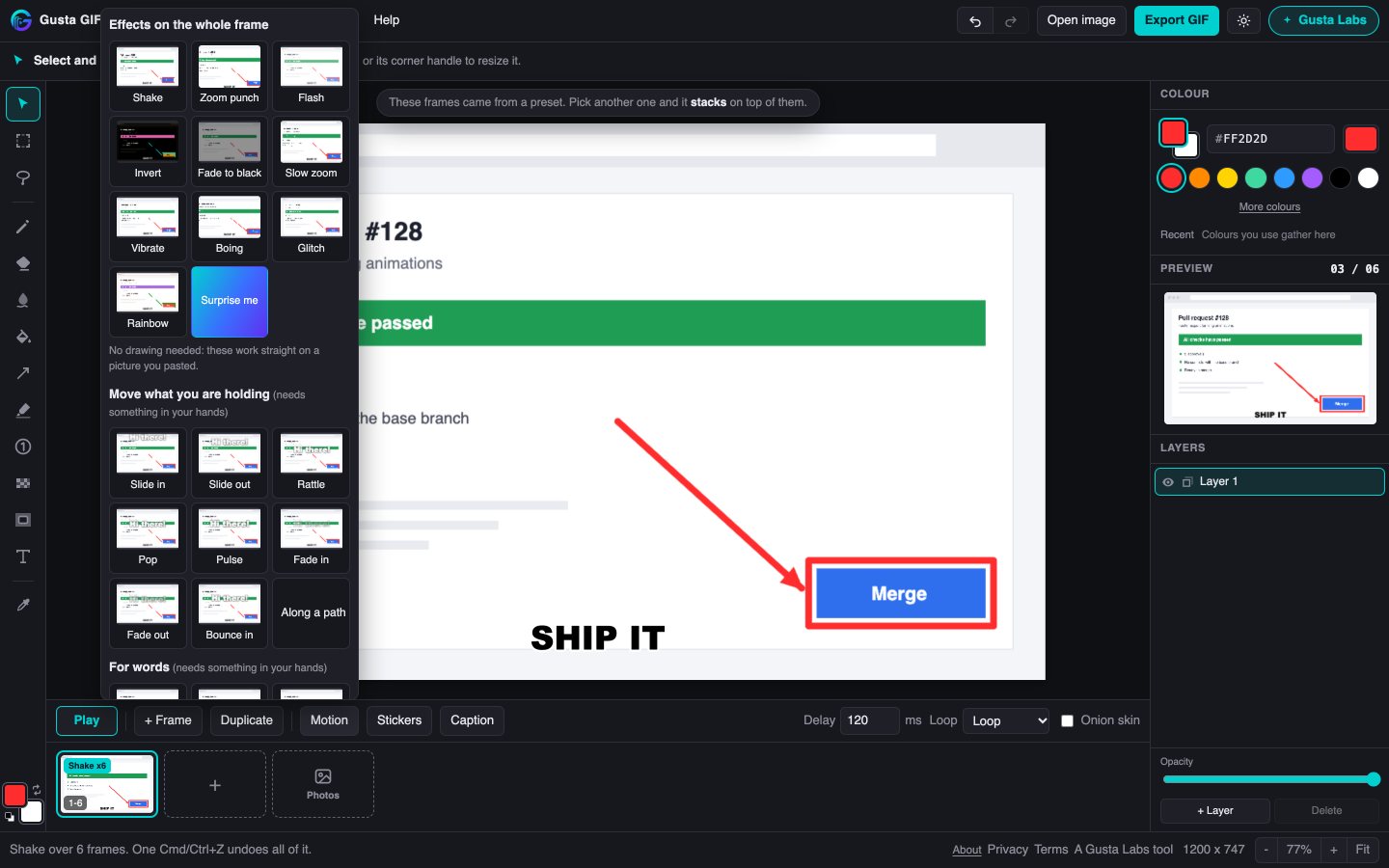
Motion presets move whatever you are holding: slide in or out, rattle, pop, pulse, fade, bounce, or follow a path you drag. Effects work on the whole frame with no drawing at all: shake, zoom punch, flash, invert, fade to black, slow zoom, vibrate, boing, glitch and rainbow, or Surprise me. Every one of them plays a preview on your own picture before you pick it, and a whole generated run is one undo step. Hold a frame on screen longer for the pause before a punchline, see the neighbouring frames with onion skin, and play it as a loop or back and forth.
Sending it
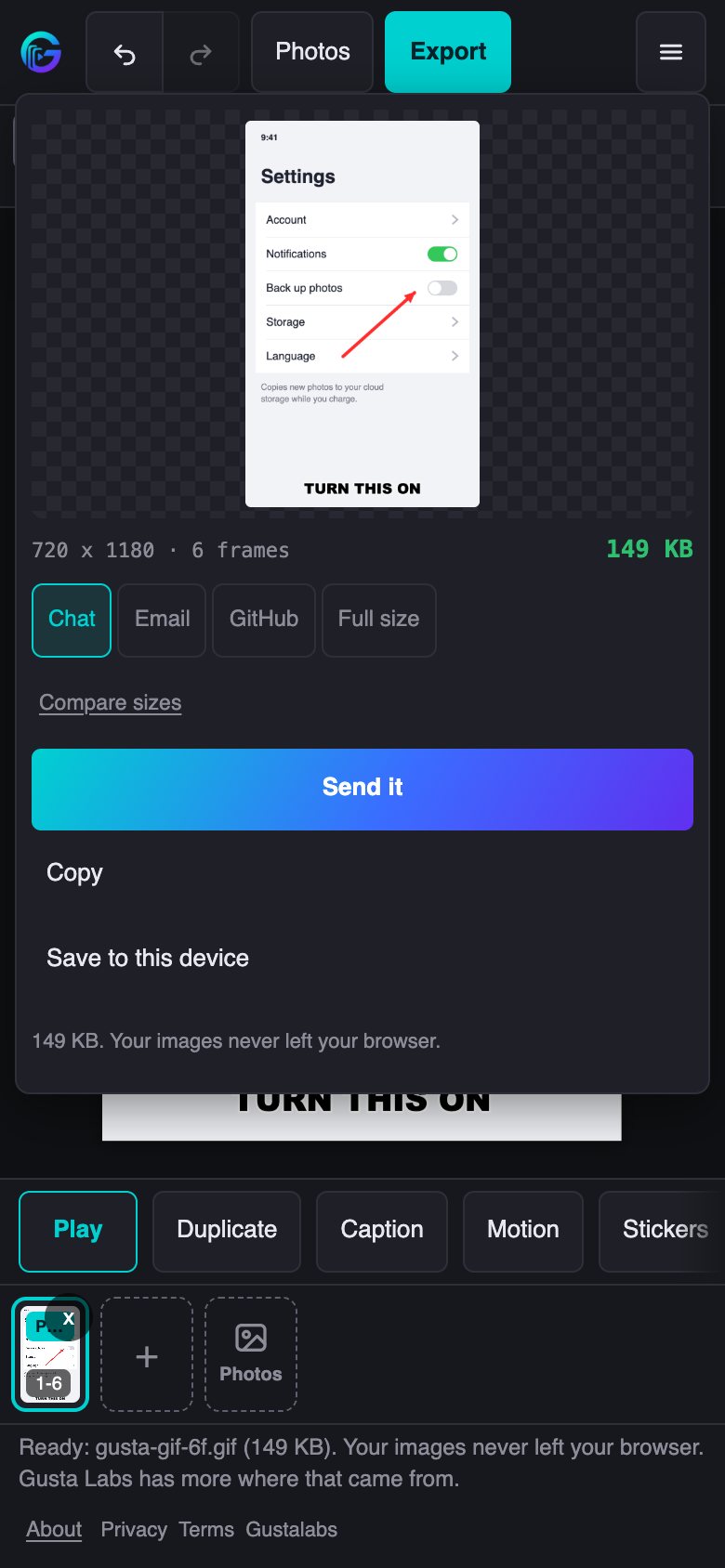
The export panel plays the finished GIF with its real, measured size, against targets named by where it is going: Chat under 2 MB, Email under 5 MB, GitHub under 10 MB, or full size. Compare sizes encodes a smaller and a 64-colour version and shows what each one really weighs. A GIF too big for a chat window is re-encoded smaller rather than bounced by the other end. Then Send it to Slack, Messages or WhatsApp through the share sheet where the browser supports it, copy it, or save it. Encoding runs in the background, so the editor never freezes while it works.
On a phone or a tablet
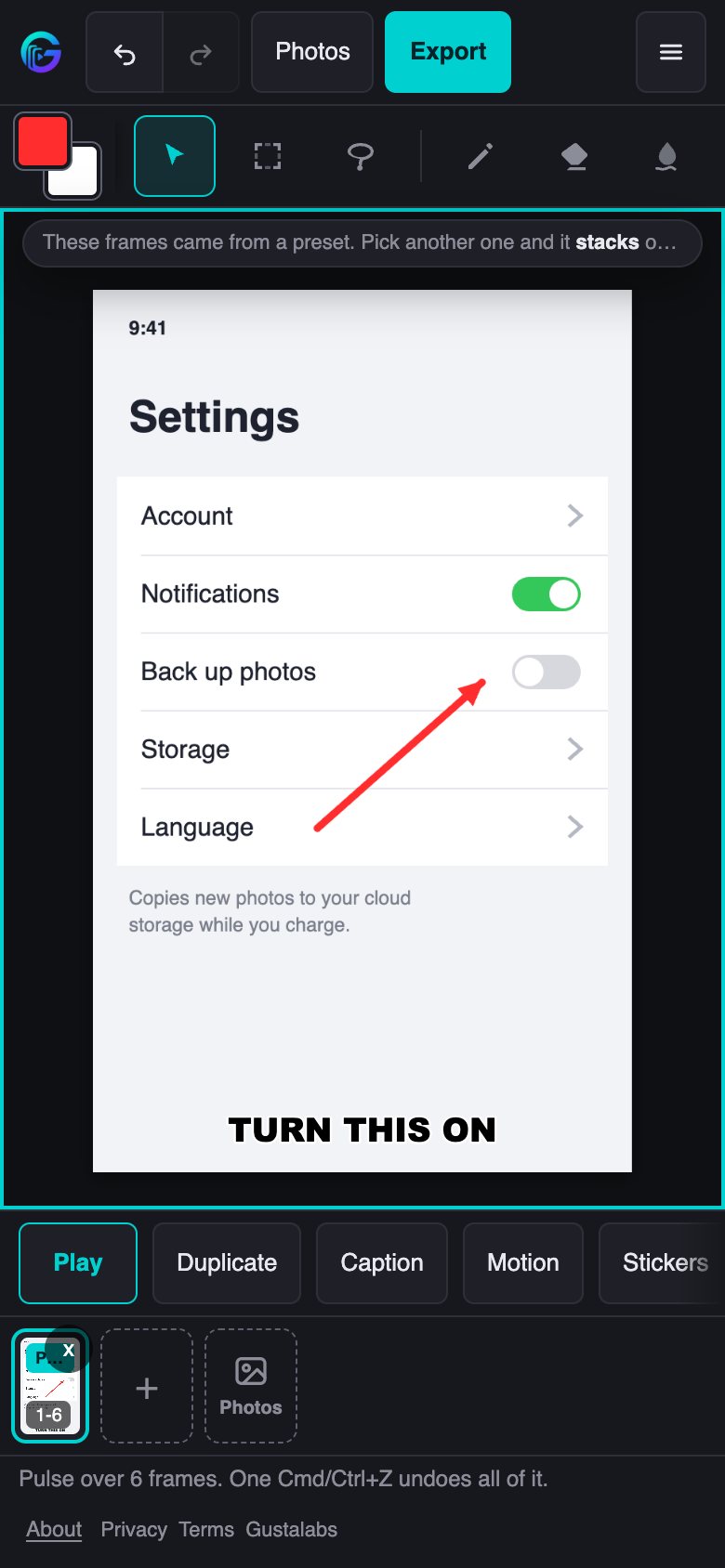
Touch and Apple Pencil are first class, pressure included. Two fingers pinch to zoom and pan, a two-finger tap undoes and a three-finger tap redoes, and dragging something onto the bin throws it away. Every control reaches the 44 pixel touch size, the layout stacks on a narrow screen, and a tablet held sideways keeps the side layout with a taller canvas.
What makes it different
No watermark, ever. Nothing is stamped on your picture. The only credit is a comment block inside the GIF file, which nobody looking at your GIF will ever see.
Nothing uploaded. Your screenshots, the frames and the GIF are made and encoded in your browser. The only thing the page reports is an anonymous session count, with no cookies and no image data.
No account. There is nothing to sign up for and nothing to log in to. Open the page and paste.
Free. All of it: every tool, every effect, every export.
Questions people ask
Is Gusta GIF free?
Yes, all of it. Every tool, effect and export is free, there is no account to create and no paid tier, and the GIF you export carries no watermark.
Are my screenshots uploaded?
No. The images you paste, the frames you draw and the GIF itself are made and encoded in your browser and never sent anywhere. The only thing the page reports is an anonymous session count: a random id for that visit, the app name, and when the visit started and ended. No cookies and no image data.
How do I make a GIF from a screenshot?
Take a screenshot, open gif.gustalabs.com and paste it with Cmd or Ctrl and V. Draw an arrow at what matters, add a caption if you like, then either pick a motion preset or duplicate the frame and nudge the arrow on the copy. Export, and the finished GIF is ready to send, copy or save.
Can I edit a GIF someone sent me?
Yes. Drop the GIF in and it comes apart into frames you can draw on, at its own size and speed, in one undo step. A long GIF is thinned evenly across the whole loop rather than cut short.
Will the GIF be small enough for Slack, Teams or GitHub?
The export panel measures the real file and names the targets: under 2 MB for chat apps, under 5 MB for email, under 10 MB for a GitHub issue or pull request, or full size. Compare sizes encodes a smaller and a 64-colour version so you can see what each one weighs, and a GIF too big for a chat window is re-encoded smaller instead of being bounced.
Does it work on a phone or an iPad?
Yes. Touch and Apple Pencil, pressure included, are first class. On a phone the Photos button opens your library, and picking several photos at once makes a slideshow. Two fingers pinch to zoom, a two-finger tap undoes and a three-finger tap redoes, and export can send the GIF straight to a chat app through the share sheet.
Does Gusta GIF save my work?
No, on purpose: there are no project files and nothing is stored between visits. A GIF here is a minute's work, and the GIF you export is the result. If you want to change it later, drop the exported GIF back in and it comes apart into frames again.
Does Gusta GIF work offline?
The page has to load over the internet, since there is no offline installer. After that everything runs in your browser: drawing, playback and encoding the GIF need no server at all.
Open it and paste a screenshot
Nothing to set up. Copy a screenshot, open the editor and press Cmd or Ctrl and V, or start from one of the layouts if you would rather not begin with a picture.
Open Gusta GIFAlso from Gustalabs: Gusta Photo, a photo editor that never invents a pixel, Gusta Draw, an online vector and SVG editor, Gusta Music, a browser music studio, and Gusta 3D, parametric CAD for 3D printing.