
Gusta Video
Cut your footage in the browser, with an AI that edits alongside you
Gusta Video is a timeline editor for people with footage and an evening: bring in the clips from your phone, camera or drone, cut them, lay music under them, put a title on, and export a video you can post or send. Gusta, the AI copilot, edits with the same tools you use. Your footage never leaves your device.
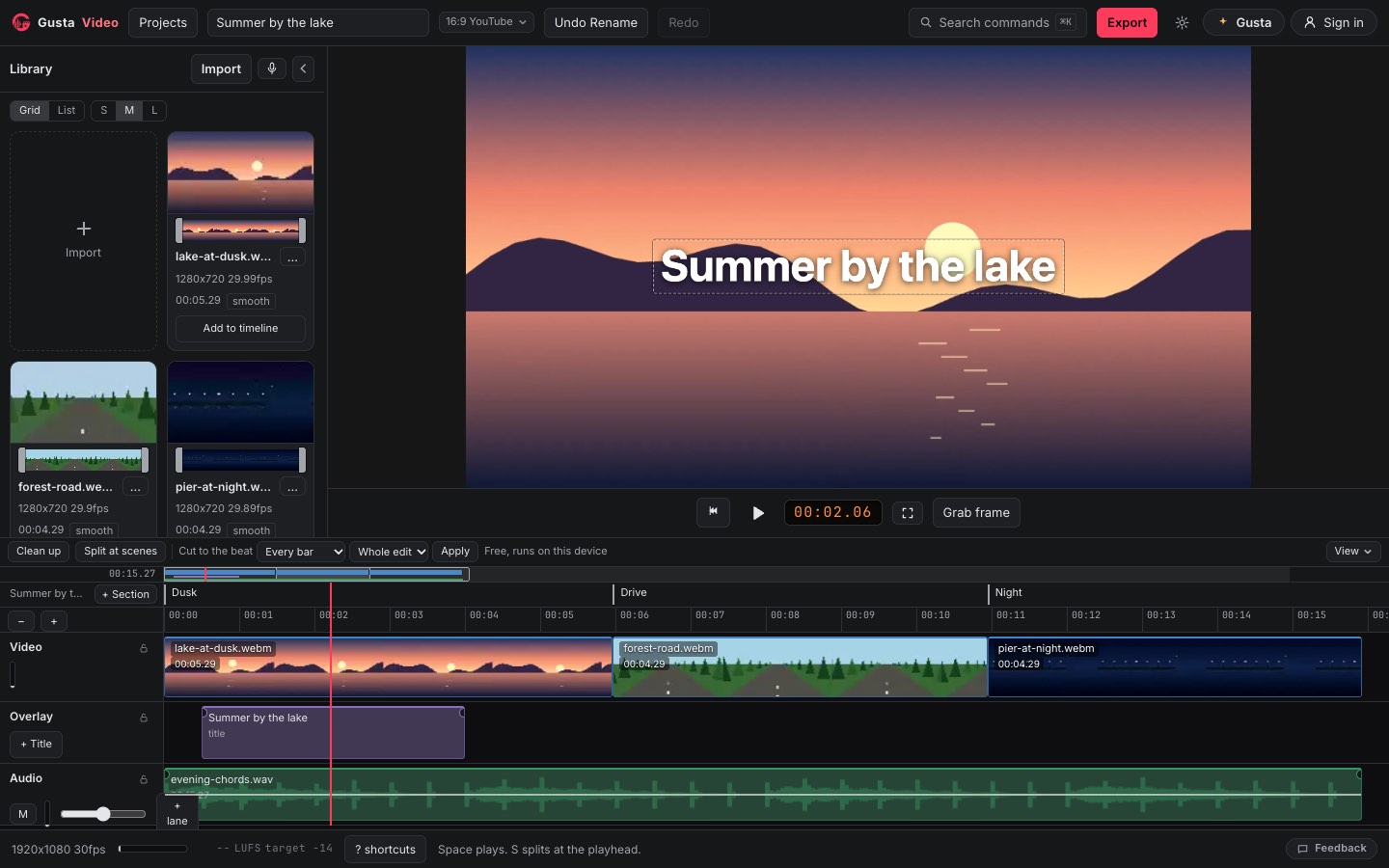
What Gusta Video is
An editor with a real timeline, not a template machine. There is one video track, a track on top of it for titles, stills and picture in picture, and up to two audio lanes for music and voice. Every change is an ordinary step you can undo, whether you made it or Gusta did.
It all runs in your browser tab, through the browser's own video engine. Your footage is read from your device and kept in the browser's private storage there; the timeline plays light editing copies the app makes on import, and the export goes back to your originals at full quality. Nothing is uploaded to cut, play or render.
Who it is for
People who know where the cuts go but do not want to learn a professional suite to make them: a trip, a match, a birthday, a talk to camera for YouTube, a drone flight. If you have wondered why a free online video editor needs your footage on its servers, this one does not.
What is inside
Getting started
Drop clips on the page or open them: video, audio and still images your browser can decode, MP4, MOV, WebM and MKV included. A clip whose picture or sound this browser cannot play says so on its card, so nothing goes quietly silent. An empty edit opens on a start panel: pick a shape (widescreen 16:9, vertical 9:16, square or 4:5), or press Rough cut my footage for a first cut built from the shot changes and highlights in your clips, made on your device without spending a token. Change the shape later and each clip fits or fills the new frame; drag the crop window to choose what a vertical cut keeps.
Cutting
Split at the playhead with S, drag an edge to trim, ripple delete a shot so the rest closes up, or drag it onto another cut and the titles and sound that start on it travel along. Roll and slip work on the cut and the clip themselves. Snapping is visible: a line and a label say what caught, the playhead, a section or a clip edge, and a trim that runs out of footage says so. Transitions are a crossfade, a wipe, a slide, a fade to black or a dip to white. A shot can play at a constant speed from a quarter to four times, hold on a freeze frame, or come round again as an instant replay. Space, J, K and L play and shuttle, the arrow keys step a frame, and on a desktop Cmd or Ctrl and K finds every action by name.
Sound
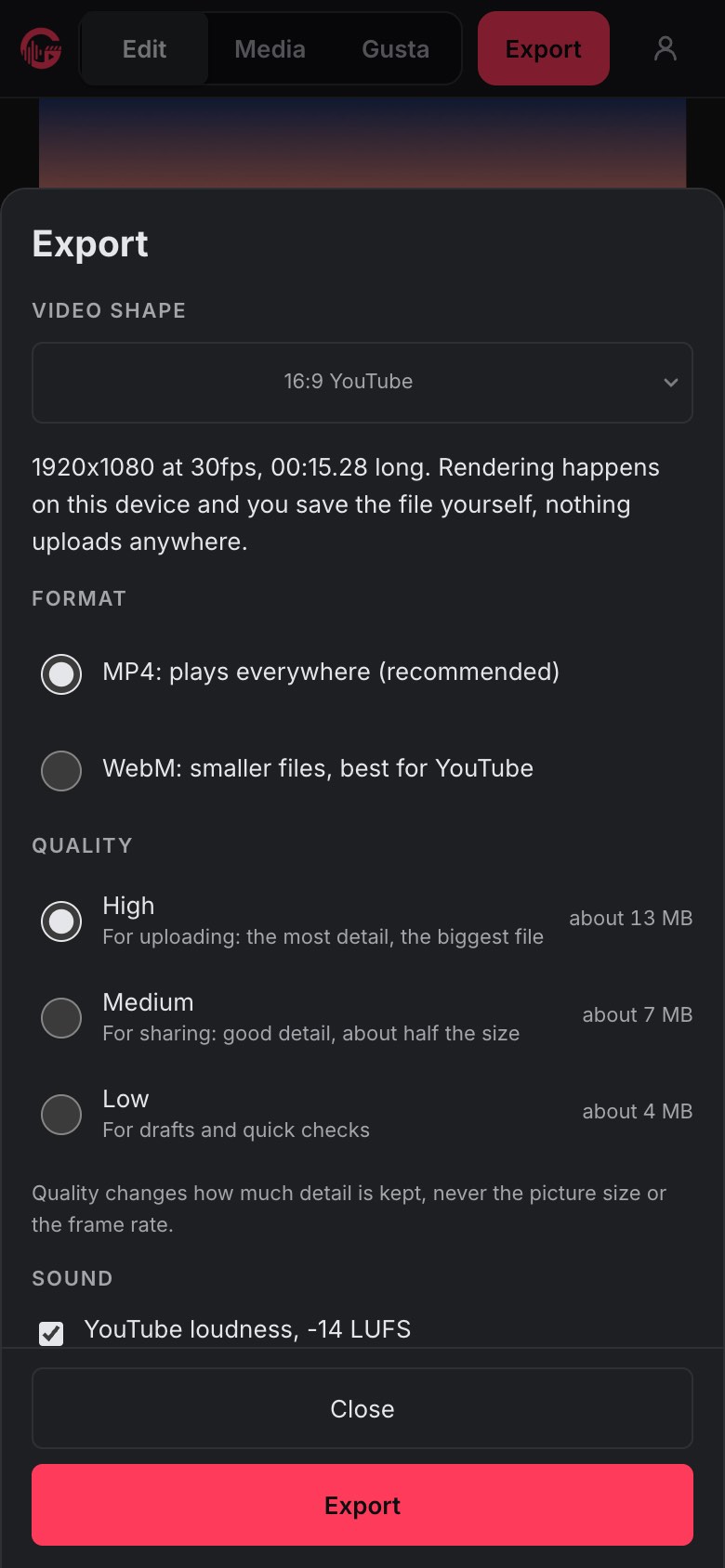
Each lane has its own gain and a live level meter, every clip its own fades, and a clip's sound can be detached onto a lane of its own. Record a voiceover straight from your microphone. Switch on beats and a music clip shows its beat grid, and drags snap to its bars and beats. At export, YouTube loudness (on by default) measures the whole mix and sets it to -14 LUFS with one plain gain: no limiter, no compression.
Titles and pictures
Title, lower third and caption presets with your choice of colour, size and typeface, dragged into place on the picture itself. Still images go on the top track, and so does a second video for picture in picture, with a chroma key for green screen.
Colour
A look per clip (warm, cool, mono, punch or faded) and five sliders under it: exposure, contrast, saturation, temperature and tint. Load a .cube LUT, or let Auto colour measure the clip and set the sliders. Log footage, flat and grey on purpose, is recognised on import: bring in your camera maker's LUT and Colour recovery puts it on every log clip in one step.
Free helpers that run on your device
Clean up finds the pauses in speech and shows each proposed cut on the timeline at Tight, Natural or Relaxed pacing, for you to keep or drop before anything changes. Split at scenes cuts one long take at its shot changes. Make a Short turns one section into a new project and leaves the long edit alone. Versions keep a checkpoint every ten minutes of editing and before every Gusta turn that changed the edit, alongside the ones you name.
Flight footage
Drop a DJI .SRT or .OSD log in with its video and the app reads the flight: speed, altitude, vertical speed and GPS track gauges you can lay over the picture, and the dives and speed peaks found as highlights. The positions in the log never leave your device.
Export
MP4 (H.264 and AAC) where your browser encodes it natively, which is what plays on TVs, phones and messengers, and WebM (VP9 and Opus) in every browser, up to 1080p at 30 frames per second, for the whole edit or one section. No watermark. The size estimate is worked out from the same bitrate the encoder is given. When the render is done, the app reads its own file back and lists what came out, length, codecs, frame rate and loudness, with a contact sheet of frames from it, before you press Save. On a phone, Save to Photos or Share is right there.
On a phone or a tablet
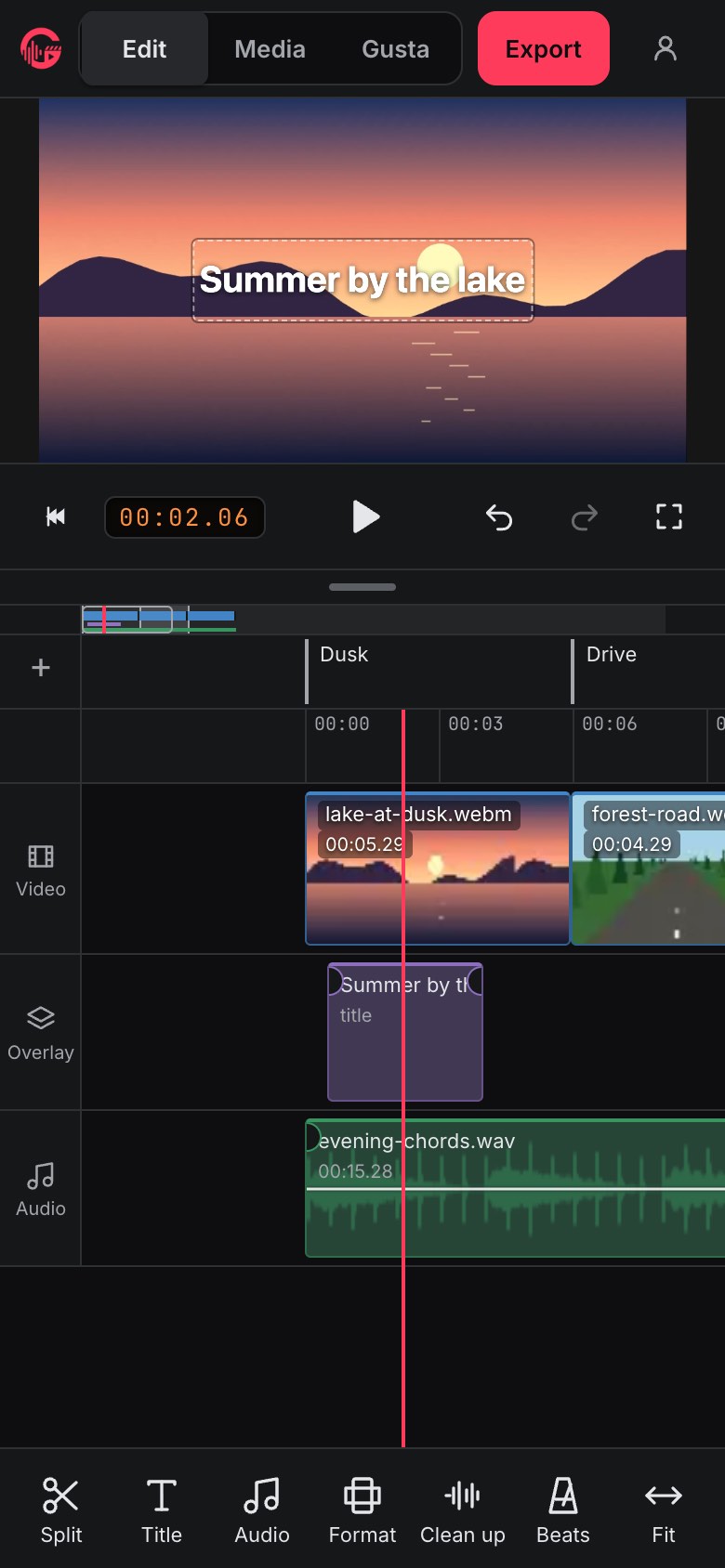
The same timeline as the desktop, not a cut-down viewer. On a phone the playhead is a fixed line in the middle and the timeline scrolls under it, so Split always cuts where you are looking; two fingers pinch to zoom; and split, duplicate, delete, undo and + Title sit at the bottom in thumb reach. Media, Edit and Gusta are three tabs, and a Gusta reply keeps streaming while you watch the edit change. Turned sideways, the picture sits beside the timeline.
Editing with Gusta
Ask in plain words: "cut the silences", "tighten section 2", "duck the music under my voice", "put a title over the first shot". Gusta edits through the same commands as the timeline, so what it does is an ordinary edit. It knows where you are pointing, the playhead and the selected clip, so "cut here" means here.
A reply that changed the edit lists the changes in words, each one a button that plays that moment, and Undo this turn takes the whole turn back in one tap. Lock a clip from Gusta and it will not trim, cut or change it. Gusta needs a free Gusta account and spends tokens from the same wallet as every other Gusta app.
What Gusta reads is the edit, not your footage: clip timings, section names, the text of your titles, the names of your files, and what the app measured on your device, such as where the silences and shot changes are. Never video or audio.
What makes it different
Your footage stays on your device. Imported video and audio never leave it, and there is no setting that would send them. Signed in, you can switch on cloud backup for a project, and it stores the edit only: clip timings, titles, section names, and the names, sizes and lengths of your files. Never the footage, the sound, or a thumbnail of it.
The browser does the work. Every file is decoded and encoded by your browser's own video engine. There is no render server and no queue.
Free to edit. Every editing tool and every export is free, with no account and no watermark. Tokens only pay for Gusta, and in the open beta they are on us.
Part of a suite. Signed in, the library lists the songs you backed up in Gusta Music and the designs you published from Gusta Draw, and brings them in with a click. Grab frame saves the frame under the playhead as a full-size PNG, ready to become a thumbnail in Gusta Draw. A project you back up shows up in your studio on gustalabs.com.
Questions people ask
Is Gusta Video free?
Editing and export are free, with no account and no watermark. Every tool, look and export format costs nothing, and so do Clean up, Split at scenes and the rough cut, which run on your device. Only Gusta, the AI copilot, needs a sign-in and spends Gusta tokens. Gustalabs is in open beta, so nothing is for sale yet and those tokens are granted free while we test.
Is my footage uploaded?
No. The video and audio you import are read, played and exported by your own browser and stay in its storage on your device. There is no setting that would send them anywhere, and we never see them.
What does Gusta see when I ask it for an edit?
The edit, not the footage: clip timings, section names, the text of your titles, the names of your media files, and what the app measured on your device, such as where the silences and shot changes are. Never video or audio.
What can I import?
Video, audio and still images your browser can decode, including MP4, MOV, WebM and MKV files. A clip whose picture or sound this browser cannot play says so on its card instead of importing silently broken.
What does it export?
MP4 (H.264 and AAC) where your browser encodes it natively, and WebM (VP9 and Opus) in every browser, up to 1080p at 30 frames per second. The app reads the finished file back and shows what came out before you save it.
Does it work on a phone or an iPad?
Yes. The phone and the iPad get the same timeline as the desktop. On a phone the playhead is a fixed line in the middle that the timeline scrolls under, two fingers pinch to zoom, and the tools sit at the bottom in thumb reach. A finished video can go straight to Photos or a share sheet.
Does Gusta Video save my work?
Your edit saves itself in your browser as you work, next to the footage. Signed in, you can switch on cloud backup for a project; it stores the edit only, never the footage, the sound or a thumbnail of it.
Open it and drop in your footage
Nothing to install and no account needed to edit. Open the editor, drop your clips on it, and press Rough cut my footage if you would like a first cut to start from.
Open Gusta VideoAlso from Gustalabs: Gusta Music, a browser music studio, Gusta Photo, a photo editor that never invents a pixel, Gusta Draw, an online vector and SVG editor, Gusta GIF, screenshot to animated GIF, Gusta 3D, parametric CAD for 3D printing, and Gusta Home, for planning the house you already have.