
Gusta Music
Make music in your browser: an online studio with no download
Gusta Music is a mini DAW that runs in a browser tab: a multitrack timeline, real instruments, a piano roll, a mixer, a microphone input and an AI copilot that edits the song with you. Nothing to install, and what you finish is a real arrangement of real notes that you own outright.
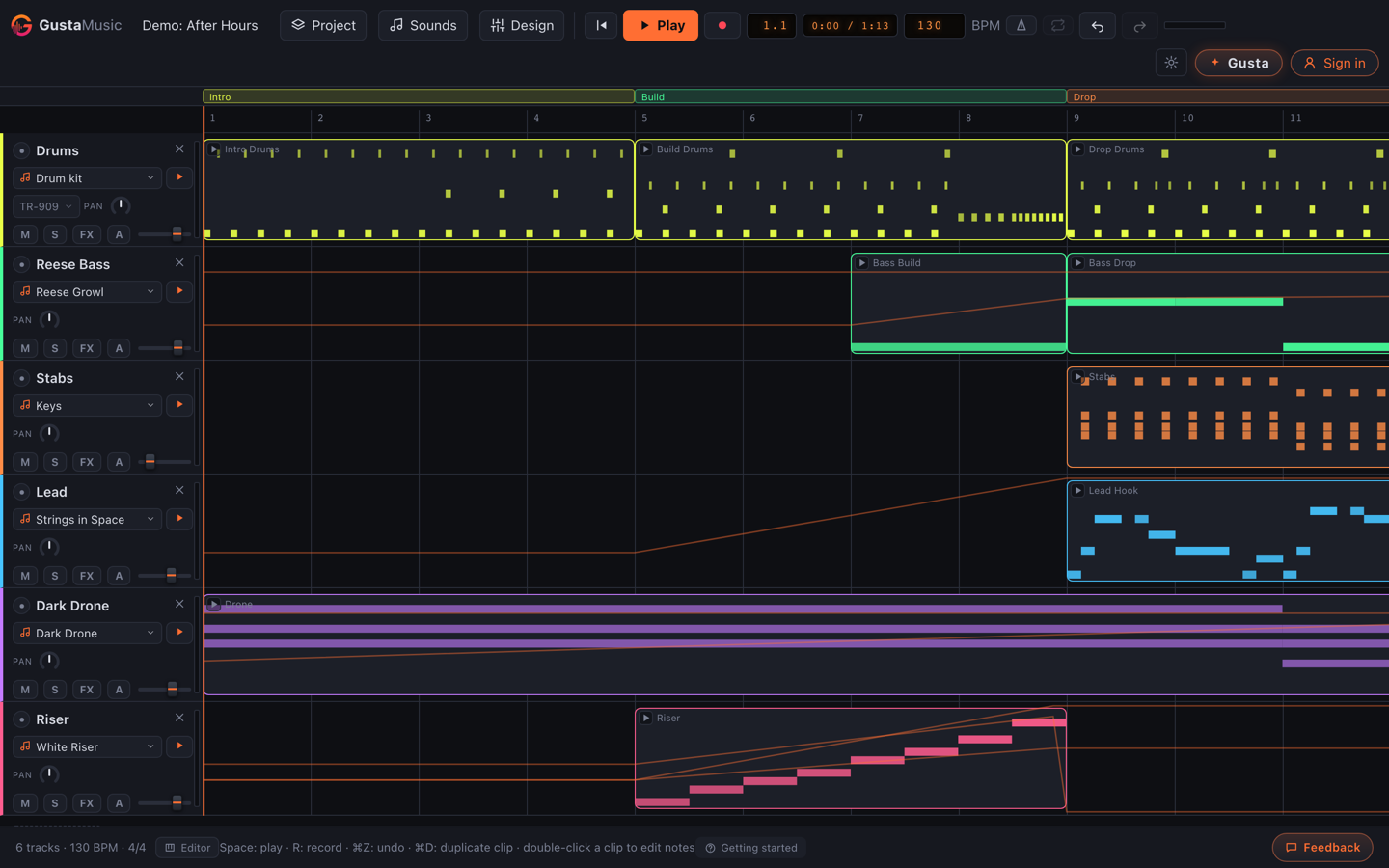
What Gusta Music is
Most music software wants a download, a licence and an evening of setup before it makes a sound. Gusta Music wants a browser. It is a small digital audio workstation for people who have an idea and forty minutes: sketch a beat, put chords under it, record a vocal, mix it, export a file. Underneath, a song is a plain document, and every change, yours or the AI's, goes through one editing layer, which is why undo always works.
Who it is for
Hobbyists who want to make beats in the browser without committing to a big install. Songwriters who want to hear an idea arranged rather than described. Anyone on an iPad who has been told real music software does not run there. It is where an idea becomes a song instead of a voice memo.
What is inside
A timeline that behaves like a timeline
Tracks stack down the left with volume, pan, mute, solo, a record-arm dot and a live meter. Clips drag and resize across the ruler, and dragging on the ruler sets a loop region so you can work four bars until they are right. Section markers label the arrangement, and the tempo can change across the song rather than being one number.
Sounds you pick rather than build
Instead of a wall of synthesis parameters there is a sound browser on every track head: families of designed sounds with variations, and tapping one plays it through that track's real effect chain, so you hear exactly what you are choosing. Build a sound you like and you can save the whole track voice under a name, then reuse it in any project or ask the copilot for it by name.
Patterns, not note-by-note drudgery
Drum patterns come from a library organised by genre, with an intensity control that thins or thickens the layers and an option to drop a fill every few bars. Chords are entered as symbols and voiced for you. The strum editor works the way a guitarist thinks: chords per bar on top, a grid of down and up strokes underneath, rendered into real guitar voicings. Melodies can be written as scale degrees, which keeps them in key by construction.
Recording, with a microphone or a keyboard
Arm a track and hit record: you get a count-in, a live input meter, optional monitoring and a ghost clip that grows as you sing, and the take lands in your sample library and on the timeline at once. With a MIDI keyboard, notes play the armed track's instrument live and are captured as a note clip rather than audio.
Your own audio, understood
Import an MP3 or a WAV and it is analysed: samples over eight seconds get a detected tempo and key, so dropping one in stretches it to your song's tempo instead of fighting it. Stem tools split a track into drums and music, reduce a centred vocal, or tune a take to the key of the song, all computed in your browser rather than uploaded anywhere. A one-click vocal pass tunes the lead in place and lays doubles and a harmony underneath, as one undo step.
Mixing, and getting the song out
Every track runs the same chain: distortion, a six-band EQ with a drawable curve, filter, chorus, delay, reverb, then volume, pan, mute and solo into the master bus, plus automation lanes. Export uses those same chain builders, so the file you download is the mix you heard: a master as 16-bit or 24-bit WAV or MP3, every track as its own 24-bit WAV in a zip, a standard MIDI file with drums on channel 10, or the project file with its samples bundled in.
What makes it different
The AI uses the tools instead of talking about them. Gusta does not hand you a paragraph about what a lo-fi groove should contain. It dispatches the same edits your clicks do: adding a track, choosing a sound, writing a drum pattern, voicing chords. Each one lands on the timeline as an ordinary change you can select, nudge or undo, and the clips it touched are marked so you can see which parts came from the machine.
Your work stays yours. This is not prompt-to-song. No model hands you a finished audio file you are then licensed to use. There is a document full of notes, samples and settings, and you are its author. That distinction is the point.
Local first. Projects live in your browser by default and samples are stored on your device. Audio analysis, stem separation and pitch correction all run locally. Signing in adds cloud saves and the copilot; it does not move your work somewhere you cannot reach it.
Free to start. The studio is free. Only AI work spends tokens, and during the open beta those tokens are granted rather than sold.
Free tools, no account needed
Some of what the studio does is useful on its own, so those parts have pages of their own. Each one runs entirely in your browser: the audio never leaves your device, there is nothing to install, and you do not need an account.
- BPM detector Drop in a track and read its tempo, from the same onset analysis the studio uses when you import a sample.
- Song key finder Find the key and the chords that fit it, using a chromagram and the Krumhansl profiles rather than a guess.
- Vocal remover Cancel the centre channel to pull a centred vocal out of a stereo mix, with the bass kept rather than hollowed out.
- Stem splitter Separate the percussive hits from the sustained parts and download both as WAVs.
- Metronome An accurate click with adjustable tempo, time signature and accent, scheduled on the audio clock.
Questions people ask
Is Gusta Music free?
Making music is free. The instruments, the drum and chord tools, recording, mixing and every export cost nothing. Only the AI copilot is metered, and it runs on Gusta tokens. Gustalabs is in open beta, so nothing is for sale yet and those tokens are granted free while we test.
Do I need to download or install anything?
No. Gusta Music is a website: open studio.gustalabs.com in a current browser and the studio is there, with no installer, no plugin and no audio driver to configure. Recording asks for microphone permission the first time you arm a track, and that is the only prompt you will see.
Do I own the music I make?
Yes. Your songs, recordings, exports and project files belong to you, and our terms assign you any rights we might otherwise hold in output the built-in AI helped generate. No rights tiers, no royalty share. The copilot works with the built-in instruments, license-free sounds and your own recordings, never with other people's records.
Does it work on an iPad or a phone?
Yes. Touch is a first-class target, not an afterthought. On a tablet the track controls grow to stay tappable and the right-click menus are reachable from a button on the selected clip. On a phone the app switches to a dedicated shell with Song, Sounds, Gusta and More tabs.
What formats can I export?
A finished mix as 16-bit or 24-bit WAV, or as MP3. Every track as its own 24-bit WAV in a zip, which is what you hand to another DAW or a mixing engineer. A standard MIDI file with tempo, time signature, section markers and drums on channel 10. And the project itself as a .gusta.json file that reopens intact, bundling the samples it uses.
Does Gusta Music work offline?
Partly, and we would rather be precise. There is no offline installer and no service worker, so the page has to load over the internet. After that the work is local: playback, editing, recording and export run in your browser, and projects autosave to your device. The copilot and cloud saves are the parts that genuinely need a connection.
Do I need an account?
Not to make music. The studio opens and works signed out, and your projects live in your browser. An account only matters for the two cloud features: the AI copilot, and cloud saves that follow you between devices. One Gusta account covers Gusta Music, Gusta 3D, Gusta Draw, Gusta Photo, Gusta Video, Gusta GIF and Gusta Home.
Open it and make something
There is a demo song waiting, plus free starters for lo-fi, boom-bap, trap, house and synthwave if you would rather begin from a groove than from silence.
Open Gusta MusicAlso from Gustalabs: Gusta 3D, parametric CAD for 3D printing, Gusta Draw, an online vector and SVG editor, Gusta Photo, a photo editor that never invents a pixel, Gusta Video, a video editor where your footage never leaves your device, Gusta GIF, screenshot to animated GIF, and Gusta Home, for planning the house you already have. One account works in all of them.